
FUNCTION Definition
The following is the function wrapper which will contain the remainder of the code.FUNCTION Remove-MyPWDocumentExplicitAccessControl { <# .Synopsis Removes ALL access control entries from document objects. .DESCRIPTION Gets ALL documents with explicit access control applied and removes each access control entry. There aren't any parameters with this function. .EXAMPLE The following finds and removes all explicit document access control. Remove-MyPWDocumentExplicitAccessControl -Verbose #> [CmdletBinding()] param (...) # end param... BEGIN {...} # end BEGIN... PROCESS {...} # end PROCESS... END{...} # end END... } # end FUNCTION Remove-MyPWDocumentExplicitAccessControl... Export-ModuleMember -Function Remove-MyPWDocumentExplicitAccessControl
Parameters
First thing we need to do is create our parameter and value pairs. The help messages will explain the purpose for each parameter. There aren’t any parameters for this function.param (
) # end param...
BEGIN
I want to take a second and point out a couple of conventions that I use in my scripts. First, you may notice that I put a comment at the end of many of the blocks of code. Doing this makes it easier for me to determine where a block of code starts and ends. Comes in handy when troubleshooting a script. I also add text ([BEGIN], [PROCESS], [END]) in the output messages (Write-Verbose, Write-Warning, Write-Error) corresponding to the section of the script I am in. Again, this makes it obvious where something occurs within the script.BEGIN {
$CmdletName = $MyInvocation.MyCommand.Name
$StartTime = Get-Date
Write-Verbose -Message "[BEGIN] $StartTime - Entering '$CmdletName' Function..."
} # end BEGIN...
PROCESS
Now, we will proceed to the PROCESS code block. Here we will look at how to get all of the documents with explicit access control applied. How to obtain the access control entries for each document and subsequently remove them.PROCESS {
try {
# The object type for a document is 4. DO NOT MODIFY THIS!
$objType = 4; # Document
$sql_Docs = "SELECT o_projectno as ProjectID, o_itemname AS DocName, o_itemno AS DocID, o_aclno FROM dms_doc WHERE o_aclno IN (SELECT DISTINCT(o_aclno) FROM dms_acce WHERE o_objtype = $objType)"
$sqlResults_Docs = Select-PWSQL -SQLSelectStatement $sql_Docs -Verbose -ErrorAction Stop
Write-Verbose -Message "[PROCESS] $($sqlResults_Docs.Rows.Count) documents found with explicit access control."
foreach($doc in $sqlResults_Docs.Rows){
$sqlResults_AccessItems = Select-PWSQL "SELECT * FROM dms_acce WHERE o_aclno = $($doc.o_aclno)"
Write-Verbose -Message "[PROCESS] '$($doc.DocName)' - $($sqlResults_AccessItems.Rows.Count) access control entries found."
foreach($accessItem in $sqlResults_AccessItems.Rows){
if([pwwrapper]::aaApi_RemoveAccessList($objType, $doc.ProjectID, $doc.DocID, $accessItem.o_workflowno, $accessItem.o_stateno, $accessItem.o_memtype, $accessItem.o_memberno)) {
Write-Verbose -Message "[PROCESS] Successfully removed access control record."
} else {
throw [pwwrapper]::aaApi_GetMessageByErrorId([pwwrapper]::aaApi_GetLastErrorId())
}
} # end foreach($accessItem in $sqlResults_AccessItems.Rows)...
} # end foreach($doc in $sqlResults_Docs.Rows)...
} catch {
Write-Warning -Message "[PROCESS] $_"
} # end try/catch...
} # end PROCESS...
END
Lastly, we will proceed to the END block of code.END {
$EndTime = Get-Date
Write-Verbose -Message "[END] It took $($EndTime - $StartTime) to complete the process."
Write-Verbose -Message "[END] $EndTime - Exiting '$CmdletName' Function..."
} # end END...
EXAMPLE
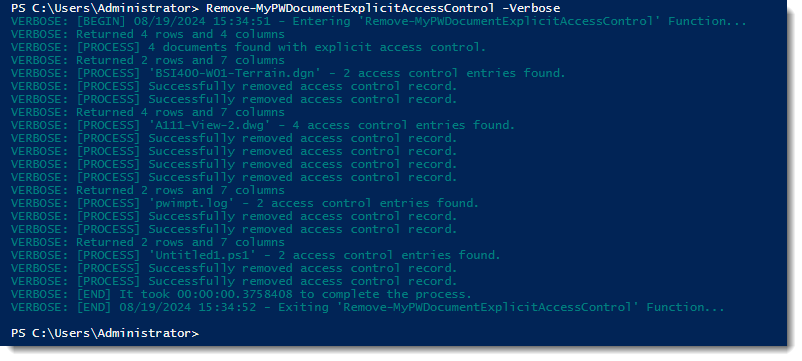
In the following example I will show how to use the cmdlet.# The following finds and removes all explicit document access control. Remove-MyPWDocumentExplicitAccessControl -VerboseThe following shows the results within PowerShell. Four documents were found with explicit access control applied.
Experiment with it and have fun. Hopefully, you find this useful. The following is a link to a zip file containing the script. FUNCTION_RemoveExplicitDocumentAccessControl
Please let me know if you have any questions or comments. If you like this post, please click the Like button at the bottom of the page.

 powerwisescripting.blog