

In this post, I’m going to share a ProjectWise customization tool I created to quickly get the Project ID or Project GUID for a selected folder or navigate to a folder by the ProjectID or Project GUID. This is a simple tool but has proven to come in handy for me.
You can download a zip file (PWTools) containing the following two files:
- PWTools.dll
- PWTools.mrr
Copy the two files into the following folder:
C:\Program Files (x86)\Bentley\ProjectWise\bin
The next time you launch ProjectWise Explorer, you should see a new “PW Tools” menu item.
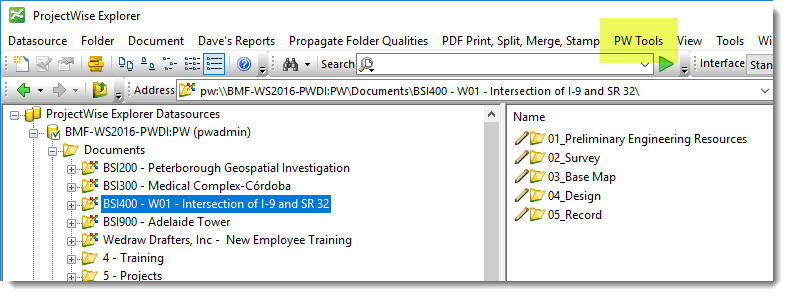
There are four commands available.
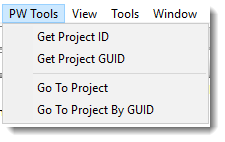
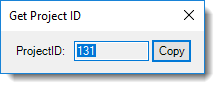
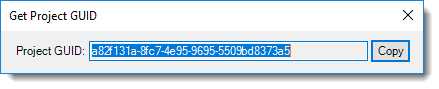
The Get commands display a dialog containing the Project ID or Project GUID.
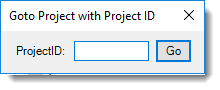
The Goto commands allow you to navigate to a folder based on the Project ID or GUID. Simply enter the ID or GUID and hit Go.

Hopefully, you find this useful.
Please let me know if you have any questions or comments. If you like this post, please click the Like button at the bottom of the page.

 powerwisescripting.blog
Wow. Nice to see the tool.
Can we have the source code for our reference to develop more using PW SDK ?
LikeLike
I’d have to do some cleanup to put it out there. But, I can probably do that.
LikeLike
Hello. Recently, I was intrigued to explore the functionalities of the Menu Editor. In pursuit of a deeper understanding, I referred to this enlightening article related to this feature. It provided a comprehensive overview, and I proceeded to implement the concepts discussed therein.
Following your guidelines, I successfully created both MRR and DLL files to incorporate custom menus into ProjectWise Explorer. However, upon completion of this process, I encountered a hurdle. While I can view the newly created menu within ProjectWise Explorer, I have been unable to trigger any actions upon clicking the associated document menu items.
I expected a message box or some form of response upon clicking these menu items, yet unfortunately, no action seems to be initiated.
I would greatly appreciate your assistance in troubleshooting this matter. Source code of PWTools would be of great help. Thank you.
LikeLike
First, thank you for checking out my blog. Hopefully, you find it useful.
As for your question, the DLL and Function name specified within the MRR file must be valid and accessible. Otherwise, you nothing will occur.
LikeLike
yes i have added the appropriate dll name and public static function name to the mrr. I have tried referencing PWTools dll and tried accessing function GetProjectID using extern Still , I have been unable to trigger any actions upon clicking the associated document menu items.
LikeLike
You solution needs to utilize the DLLExportNET4 package on a Post-Build event.
LikeLike
Problem solved with utilizing DLLExportNET4 package. Thank you for the help.
LikeLike
Here is the code snippet that I am using
namespace ProjectWiseCustomOption
{
public class MyManagedCode
{
public static void GetProjectID(int ProjectID)
{
MessageBox.Show(“Success”);
}
}
}
and i am calling ProjectWiseCustomOption.dll and GetProjectID for folder menu
Thank you for the reply!
LikeLike
Could you please provide guidance on how to effectively distribute the DLLs necessary for accessing all methods in MostOfDavesClasses, I am facing issue while accesscing dlls present in projectwise bin folder even though i have added them in the directory.
LikeLike
Are you placing them in the correct ProjectWise\Bin folder? Program Files or Program Files (x86)
Be sure you copy all dependency files created when building a Release version.
You could also request access to the Bentley Developer Network. https://bdn.bentley.com/
LikeLike
I added all the dependencies and it worked. Thanks a lot!
LikeLike
Hi,
I have added functionalities using menu editor. It is working but after few clicks and operations on new menu. ProjectWise explorer crashes giving following errors in Event Viewer
Faulting application name: pwc.exe, version: 23.6.0.15, time stamp: 0x657c0bba
Faulting module name: clr.dll, version: 4.8.4724.0, time stamp: 0x6610a031
Exception code: 0xc0000409
Fault offset: 0x0065d648
Faulting process id: 0x6f68
Faulting application start time: 0x01dabdbc42f11a0a
Faulting application path: C:Program Files (x86)BentleyProjectWisebinpwc.exe
Faulting module path: C:WindowsMicrosoft.NETFrameworkv4.0.30319clr.dll
Report Id: c96d8440-4f47-4c85-8187-d24ffb28b3dd
Faulting package full name:
Faulting package-relative application ID:
Application: pwc.exeFramework Version: v4.0.30319Description: The process was terminated due to an internal error in the .NET Runtime with exit code 80131506.
LikeLike
I have not tested this with the latest version of ProjectWise Explorer. Thanks for bringing this to my attention.
LikeLike
I am not able to reproduce this issue. Have you developed your own tools?
LikeLike