

FUNCTION Definition
The following is the function wrapper which will contain the remainder of the code.<# .Synopsis Export documents from ProjectWise to a zip file. .DESCRIPTION Used to export documents from ProjectWise, either by Folder ID or provided documents, add them to a zip file and cleanup folder and documents. .EXAMPLE Example of using function by providing a FolderID. Export-PWDocumentsToZipFile -ExportFolder "c:\temp\export" -FolderID 162 -Verbose .EXAMPLE Example of using function by providing ProjectWise document objects. $pwDocuments = Get-PWDocumentsBySearch -FolderID 162 -JustThisFolder -Verbose Export-PWDocumentsToZipFile -ExportFolder "c:\temp\export" -PWDocuments $pwDocuments -Verbose .OUTPUTS Returns the full path and file name of the local zip file created. #> FUNCTION Export-PWDocumentsToZipFile { [CmdletBinding()] param (...) # end param... BEGIN {...} # end BEGIN... PROCESS {...} # end PROCESS... END{...} # end END... } # end FUNCTION Export-PWDocumentsToZipFile... # Uncomment the following line if you are adding this to a .psm1 file. # Export-ModuleMember -Function Export-PWDocumentsToZipFile
Parameters
First thing we need to do is create our parameter and value pairs. The help messages will explain the purpose for each parameter.param (
# Local folder to export documents to.
[ValidateNotNullOrEmpty()]
[Parameter(HelpMessage = "Local folder to export documents to.",
Mandatory=$true,
Position=0)]
[string] $ExportFolder,
# ProjectWise Documents to be exported.
[ValidateNotNullOrEmpty()]
[Parameter(ParameterSetName='Documents',
HelpMessage = "ProjectWise Documents to be exported.",
Mandatory = $true)]
$PWDocuments,
# Folder ID of ProjectWise folder to export documents from.
[Parameter(ParameterSetName='ByFolderID',
HelpMessage = "Folder ID of ProjectWise folder to export documents from.",
Mandatory = $true)]
[ValidateNotNullOrEmpty()]
[int] $FolderID
) # end param...
BEGIN
I want to take a second and point out a couple of conventions that I use in my scripts. First, you may notice that I put a comment at the end of many of the blocks of code. Doing this makes it easier for me to determine where a block of code starts and ends. Comes in handy when troubleshooting a script. I also add text ([BEGIN], [PROCESS], [END]) in the output messages (Write-Verbose, Write-Warning, Write-Error) corresponding to the section of the script I am in. Again, this makes it obvious where something occurs within the script. Here we will create a folder for the documents to be exported to. We will use a random name to ensure the folder name is unique.BEGIN {
$CmdletName = $MyInvocation.MyCommand.Name
$StartTime = Get-Date
Write-Verbose -Message "[BEGIN] $StartTime - Entering '$CmdletName' Function..."
$Continue = $true
try{
# Folder to export documents to. Using random string to ensure uniqueness.
# Create the export folder.
$Path = "$ExportFolder\$(Get-RandomString)"
$folder = New-Item -Path $Path -ItemType Directory -Force -Verbose -ErrorAction Stop
} catch {
Write-Warning -Message "[BEGIN] $_"
$Continue = $false
}
} # end BEGIN...
PROCESS
Now, we will proceed to the PROCESS code block. Here we will export the ProjectWise documents to the specified export folder. The ProjectWise documents will either be provided or a folder ID will be provided and all documents within said folder will be exported. Once the files have been exported, the containing folder and all documents will be added to a zip file. And finally, the folder and contents will be cleaned up leaving only the generated zip file.PROCESS {
try {
if( -not ($Continue)){
throw "Exiting cmdlet."
}
if( -not ([string]::IsNullOrEmpty($FolderID))) {
# Get documents to get exported.
$pwDocuments = Get-PWDocumentsBySearch -FolderID $FolderID -JustThisFolder -ErrorAction Stop
}
Write-Verbose -Message "$($pwDocuments.Count) documents to be exported."
# Export the documents to the export folder.
$pwDocs = Export-PWDocumentsSimple -InputDocuments $pwDocuments -TargetFolder $Path -Verbose -ErrorAction Stop
# Create a zip file containing the export folder and all contents. The zip file is created in the parent folder of the export folder.
Compress-Archive -Path $Path -DestinationPath $Path -Force -Verbose -ErrorAction Stop
# Cleanup exported documents and the export folder.
Remove-Item $Path -Recurse -Force -Verbose -ErrorAction Stop
# Output the pull path and file name of the generated zip file.
Write-Output "$Path.zip"
} catch {
Write-Warning -Message "[PROCESS] $_"
} # end try/catch...
} # end PROCESS...
END
Lastly, we will proceed to the END block of code.END {
$EndTime = Get-Date
Write-Verbose -Message "[END] It took $($EndTime - $StartTime) to complete the process."
Write-Verbose -Message "[END] $EndTime - Exiting '$CmdletName' Function..."
} # end END...
EXAMPLE
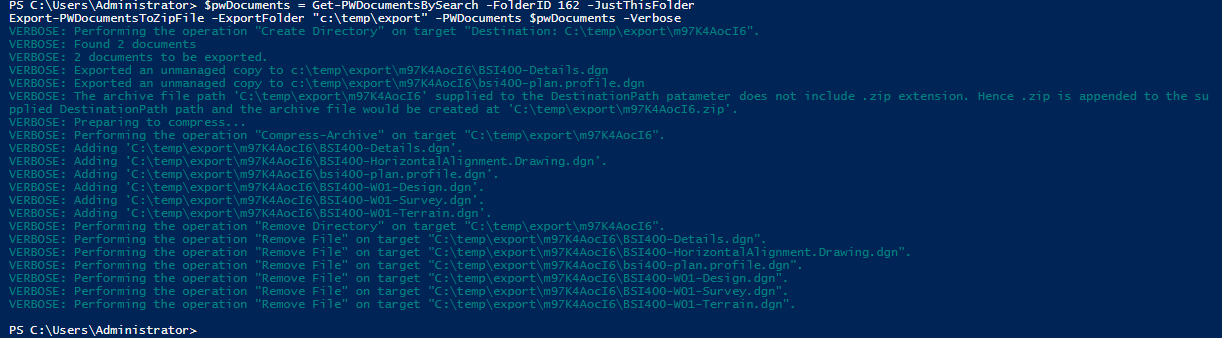
The following is a couple examples of using the Export-PWDocumentsToZipFile function.
Experiment with it and have fun. Hopefully, you find this useful. Please let me know if you have any questions or comments. If you like this post, please click the Like button at the bottom of the page.

 powerwisescripting.blog
The King has returned!
Thanks for the post!
LikeLike